MyPogoBadges Help Section
June 29th, 2023 Update
We no longer required your PID# when registering.
You can safely ignore the information below.
Below you will find the new method on how to access your PID number needed to register on this site. Please follow the instructions carefully.
How to retrieve your
PID # :
Step 1 :
Log in to your
Club Pogo account and go to your
My Collection Page.
Step 2 :
With your mouse, right click on the "
See all my earned badges" link and select "
Copy Shortcut".
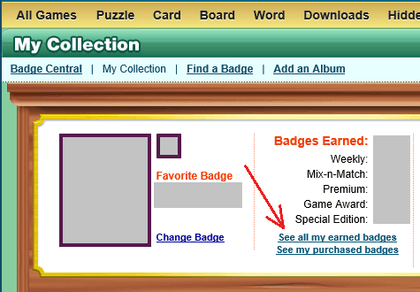 Step 3 : THE MOST IMPORTANT STEP
Hover your mouse pointer over the box below and "
right click" and then select "
Paste". Then hit the "
Submit" button.
You should now see your Pogo
PID # in the box above. Simply copy the numbers you see above and head over to our
registration page and create your
free account!